Posts

Preventing "brown out" on a solar-powered Pi Pico

Image
The problem I have been experimenting with a solar-powered Meshtastic node, comprising a Pi Pico W and a Waveshare LoRA SX1262 board (also available from AliExpress , of course). I have housed these in a budget garden solar lamp (from eBay - many available - such as this ), which provides the charging circuit, the battery, and the enclosure. I had hoped that it would also provide the solar panel, but I found this to be insufficient so I replaced it with a larger 6V solar panel . The node runs fine when the battery is charged, but there is a problem when the battery runs down - which can happen overnight after a cloudy day. The next day when the sun comes up, the battery voltage starts to climb and at some point the Pico attempts to start up. This causes a current spike, which pulls the battery down, and the Pico shuts down. It then gets into a restart loop, which never properly resolves, and the node fails to start properly. What is needed is a way to cleanly switch the power on and...

Configuring fldigi for RSGB data contests

Image
I use fldigi for RSGB data contests (RTTY and PSK modes). In this article I describe how I have configured 12 macro buttons for efficient contest operation. Here is a screen shot of the 12 buttons: They are divided into three groups. The first four buttons, teal coloured, are for "Run" mode (a.k.a. "Fox" mode), i.e. for calling CQ. The next four buttons, in brown, are for "Search & Pounce" mode (a.k.a."Hound" mode), i.e. when replying to a CQ. The final four buttons, dark blue, are seldom used in contesting but enable free text to be sent. Here are each of the button definitions: CQ - obviously used to send a CQ call <TX> CQ RSGB de <MYCALL> <MYCALL> CQ <RX> QRZ? - to send a QRZ? if needed  <TX> QRZ? QRZ? de <MYCALL> <MYCALL> k <RX> Exchange - sends RST signal report and the serial number three times, bracketed by the other party's callsign <TX> <CALL> <MYRST> <CNTR...

D-Star Simplex Channels

Image
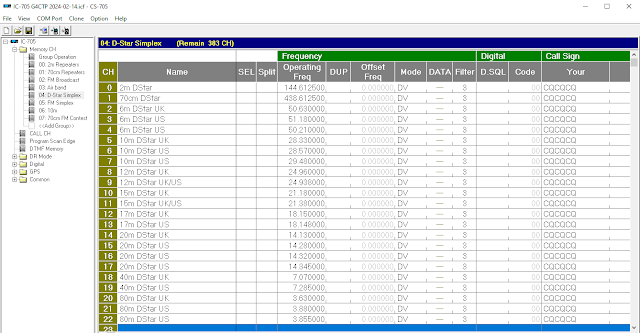
D-Star is normally used via hotspots and repeaters, but it is also possible to use this digital voice mode as point-to-point simplex. I recently added a bunch of recommended D-Star frequencies to my IC-705 memory configuration and it certainly works... but don't expect to find much activity! Here are the channels that I have configured:

A self-adhesive slot antenna for 70 cm

Image
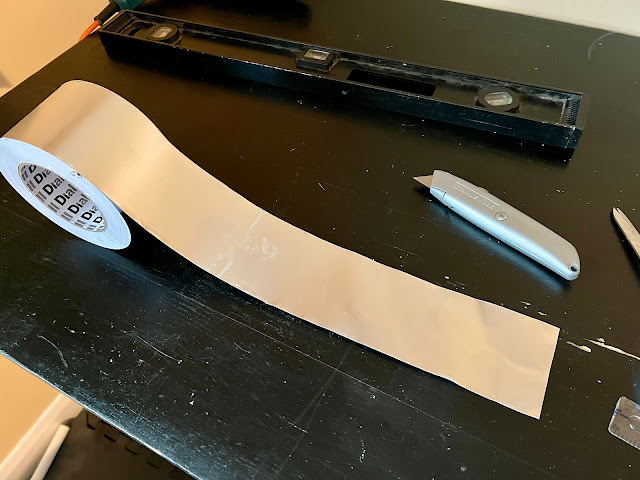
Credits and Background The inspiration for this antenna came from an excellent workshop led by Richard M0GET at a recent meeting of SEMARC . Additional ideas are from the Kindle book Slot Antennas for Ham Radio: The Forgotten Antenna by John Fortune W6NBC. The aim of this design is a simple antenna that can be stuck onto an outside window, providing vertical polarisation primarily for access to the local repeater on 70cm (FM and DMR). An unusual property of slot antennas is that a horizontal slot provides vertical polarisation - so this makes a much easier and tidier installation than (say) an equivalent vertical wire dipole. Construction Details The materials needed are: Some self-adhesive, conductive tape. I used this 75mm tape from Screwfix, but really any copper or aluminium tape will work, and the width is not critical. A short piece of thin 50Ω coax, terminated with a suitable connector.  I happened to find something suitable in my junk box: a short piece of RJ174 already f...

Trimming down the "contacts.csv" file

A challenge with the Retevis RT-3S, and other similar DMR rigs, is that the maximum number of contacts.csv entries is limited. In the case of the RT-3S, the maximum number of entries 120,000 - but the number of registered DMR IDs is now over double that quantity! Hence it is necessary to filter down the list in some way before loading it into the rig. The master file lives at  RadioID.net , although it isn't obvious where to find it. At the time of writing, the file can be found in Database / Data Dumps / user.csv.  RadioID.net offers downloads of filtered versions of the list, for subscribing users - currently $12.99/year. Alternatively it isn't terribly difficult to filter the list using Microsoft Excel. Really as an exercise in programming, I have written a Python program that can filter the list by country. The program and its instructions can be found here: https://github.com/V96GLF/DMR_Prune_Contacts  

Backing up a Raspberry Pi to a Mac

I try to keep most of my amateur radio applications on a Raspberry Pi, although some are on Mac and some on Windows. For general use I have a Mac that is always on, and this machine is backed up on-site using Time Machine and off-site using  Backblaze . So in order to keep my Pi backed up, the simplest method is to synchronise it periodically to the Mac which in turn will be included in the automatic on-site and off-site backups. Should be simple, but in practice I have found that Mac and Pi are tricky to configure over an SMB (Samba) network. Too many versions and options! Hence this blog which documents what works for me. There are two steps: 1. Configure a shared directory on the Mac, and configure the Pi to mount it automatically on its desktop. 2. Set a backup routine on the Pi, with the destination as the shared directory. It is assumed that the two machines are on the same LAN. 1. Configuring a shared folder On the Mac, create a new folder that will be shared with the Pi. In...

Adding Brandmeister to the Hotspot (DMR Part 4)

Image
So far in this series of articles we have: Built a codeplug for the Retevis RT3S, enabling it to operate on the Phoenix (DMR+) network via a local repeater. Built a Hotspot and added a new zone to the codeplug, so that the RT3S can access the Phoenix (DMR+) network using the Hotspot. I chose Phoenix initially, because that is the network that my nearest repeater uses. Whilst this gives worldwide coverage, it is not the only DMR network. Confusingly, there are quite a few networks out there - including Brandmeister, TGIF, FreeDMR and probably others. Each has its own layout of talkgroups and timeslots. Sometimes these are similar, and there are links between networks so that some talkgroups are accessible on more than one network, but each has its own quirks and so they are different and mainly incompatible. With a Hotspot, it is possible to join more than one DMR network simultaneously - up to four networks - using functionality known as DMR Master. In this blog we will look at buildin...

Constructing a simple dipole for 6m (50 MHz)

Image
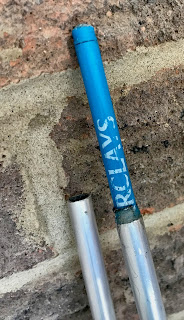
This was a fun little construction project, and very successful. The objective is a dipole for use on 6m, which I can deploy easily with my Vine Antennas Skypole Max , for temporary use on contests and FT8. The dipole uses two sections of telescoping aluminium tube for each element. Although a single piece of tube (or rod) could be used, lengths of over 1m are much more expensive to buy, and also attract additional delivery charges. Constructing the antenna using 1m lengths is much more economical, and gives the possibility of adjusting the element length by sliding one tube inside the other... of which more later. The construction method uses a central plastic box, which provides the following functions: mounting point for the two dipole elements contains a choke balun BNC termination point for the feeder method of attachment to the pole Parts List 125 x 80 x 32 mm project box - Amazon 2 lengths  1m x 10mm aluminium tube - Amazon 2 lengths 1m x 8mm aluminium rod - Amazon - but ...

RT3S VFO Mode

It took me a long time to figure out how to enter and leave VFO mode on the RT3S, because the menu options seem to keep changing! Entering VFO mode is shown in an official video here: https://youtu.be/-q6lOVjAwJs In summary, and starting from "CH Mode", the steps are: Menu > Utilities > Radio Settings > Mode > MR Mode The display should now show frequencies in MHz rather than the channel name. The functionality is unchanged, and you can still access your programmed channels as normal. Notice the small channel number indicator to the right. To get to VFO mode, long press the red key. The indicator to the right changes into a "V". Frequencies can now be entered directly from the keyboard, terminated by the green key. Rotating the channel selector knob now changes the frequencies in channel steps. I haven't worked out how it decides whether to use 12.5 kHz or 25 kHz steps. On mine, the A VFO steps in 25 kHz, and the B VFO steps in 12.5 kHz. Perhaps that...

Adding FM simplex channels to the Retevis RT3S

Image
This is a pretty simple one, but I thought it might be useful to create a Zone containing the 2m and 70cm simplex channels. There aren't enough slots to include the "in between" 12.5 kHz channels, so I have only added the more commonly used 25 kHz channels on both bands. First, create the Channels: I have named them using both the old and the new channel name conventions, i.e.: V40 (S20) - 145.500 MHz V42 (S21) - 145.525 MHz, etc. U280 (SU20) - 433.500 MHz U282 (SU21) - 433.525 MHz, etc. If you need it, a list of channels can be found here:  Simplex_Channel_Frequency.pdf (joomla.com) Note that for the 2m band, the Bandwidth should be set to 12.5 kHz, and for 70cm it should be 25 kHz. Apart from that, the settings are similar: Next, I created a Zone called "FM Simplex", and added each of the channels to it. For convenience, I put 2m channels in bank A, and 70cm channels in bank B. In each case, I put the calling channel in slot 1: Finally, I created a scan group ...